
Introduction
In industrial control and automation systems, standard best practices for updates, patches, and lifecycle management are difficult to apply. Equipment and software are built to last for decades, not years. As a result, patches are only deployed when there’s a high-risk vulnerability, and upgrades are limited to cases where the return on investment or ongoing support clearly justifies the change.
Despite these constraints, the demand for data availability has only grown. To meet it, organizations rely on defense-in-depth strategies: isolating networks, layering security controls, and conducting extensive risk and impact studies. System integrators and maintainers, facing these realities, often default to solutions that come with high hardware costs, expensive licenses, custom software, and vendor lock-in.
This demo, built on hardware and software from Portainer’s strategic partners, shows a different approach. It decouples data collection and transmission from the core control systems. Data can flow through dedicated paths, interfacing with existing field or remote I/O hardware, or with new devices added where sensors don’t exist.
The advantage is clear: you avoid the heavy costs of modifying core control systems while still enabling a modern data pipeline. This parallel path can be updated and upgraded independently, keeping pace with business needs without impacting production systems. At the same time, it aligns the security model with enterprise IT practices, reducing both cost and risk.
Strategic partners

Cedalo
The Management Platform and Pro Mosquitto add enterprise features to the MQTT broker, including web management for multiple brokers and high availability.

WAGO
Industrial controls and automation: PFC series edge compute with a fieldbus interface, 750 Series Modbus couplers and 750 Series I/O modules.

Softing
edgeConnector Modbus reads data from Modbus TCP devices and publishes it to an MQTT broker.
References used in configuration
- Cedalo MQTT Platform documentation
- Portainer documentation
- Softing edgeConnector documentation
- WAGO technical documentation
- Modbus Application Protocol Specification V1.1b3
Hardware components
WAGO 750-8213 PFC200: arm64 fieldbus controller, used as the field-based container engine platform.
WAGO 750-362 Modbus TCP bus coupler, with these I/O modules:
- 750-439: 8-channel digital input
- 750-537: 8-channel digital output
- 750-496: 8-channel analog input, 0/4-20 mA
- 750-563: 2-channel analog output, 0/4-20 mA / 6-18 VDC, 16-bit
- 750-600: end termination module
System diagram
Deployment process
Note: This example assumes network connectivity already exists between hosts. It doesn’t cover certificates, keys, or encryption beyond what is deployed by default.
Hardware preparation
Before you start, update any additional edge hardware to the latest firmware. In this demo, both the PFC200 and the 750-362 Modbus coupler were updated. If you’re interfacing with existing hardware, you can leave the Modbus device as it is.
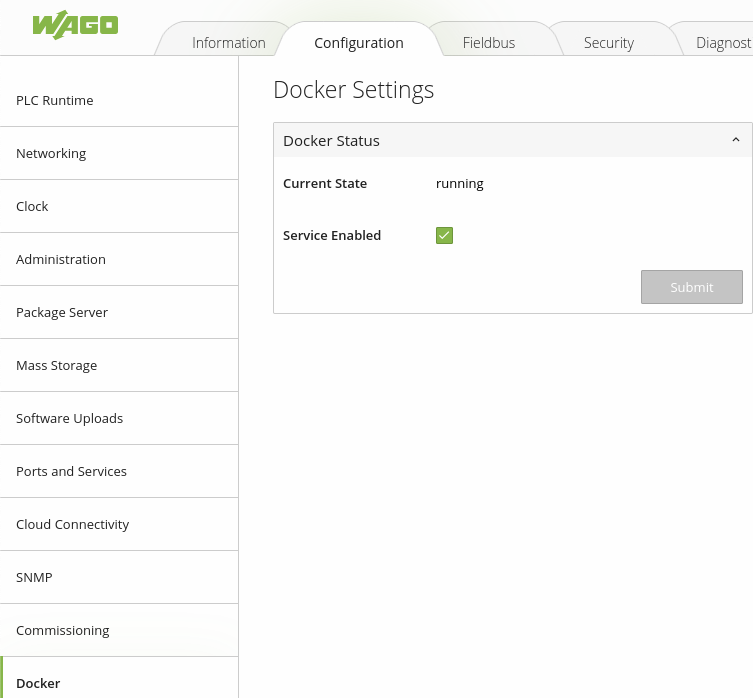
WAGO PFC devices can run as runtime platforms for typical CODESYS PLC code, or they can be switched in their web-based management (WBM) interface to run as a Docker container engine host. This demo uses the second option, with the PFC200 acting as the field compute device.
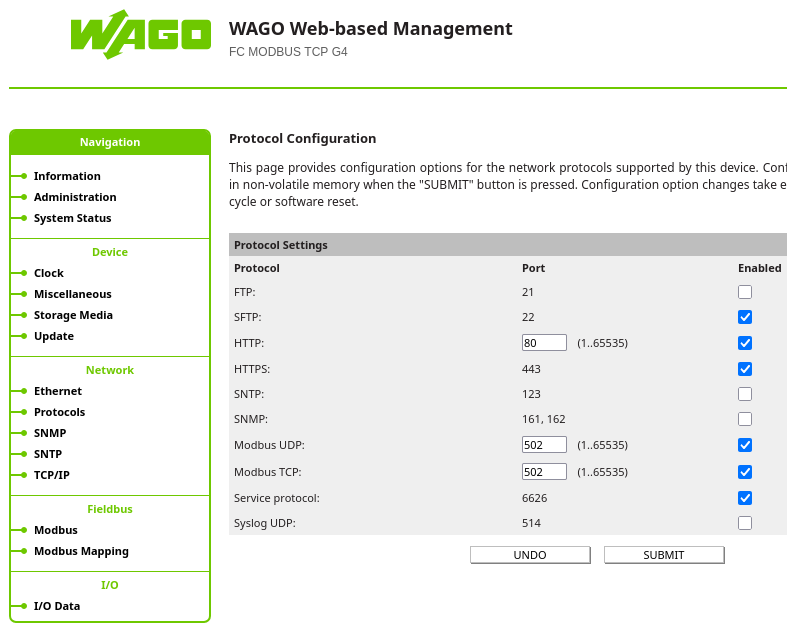
In the management interface for the WAGO 750-362 Modbus coupler (or a similar device), check that the Modbus TCP/UDP protocols are enabled and note which port they’re configured on.
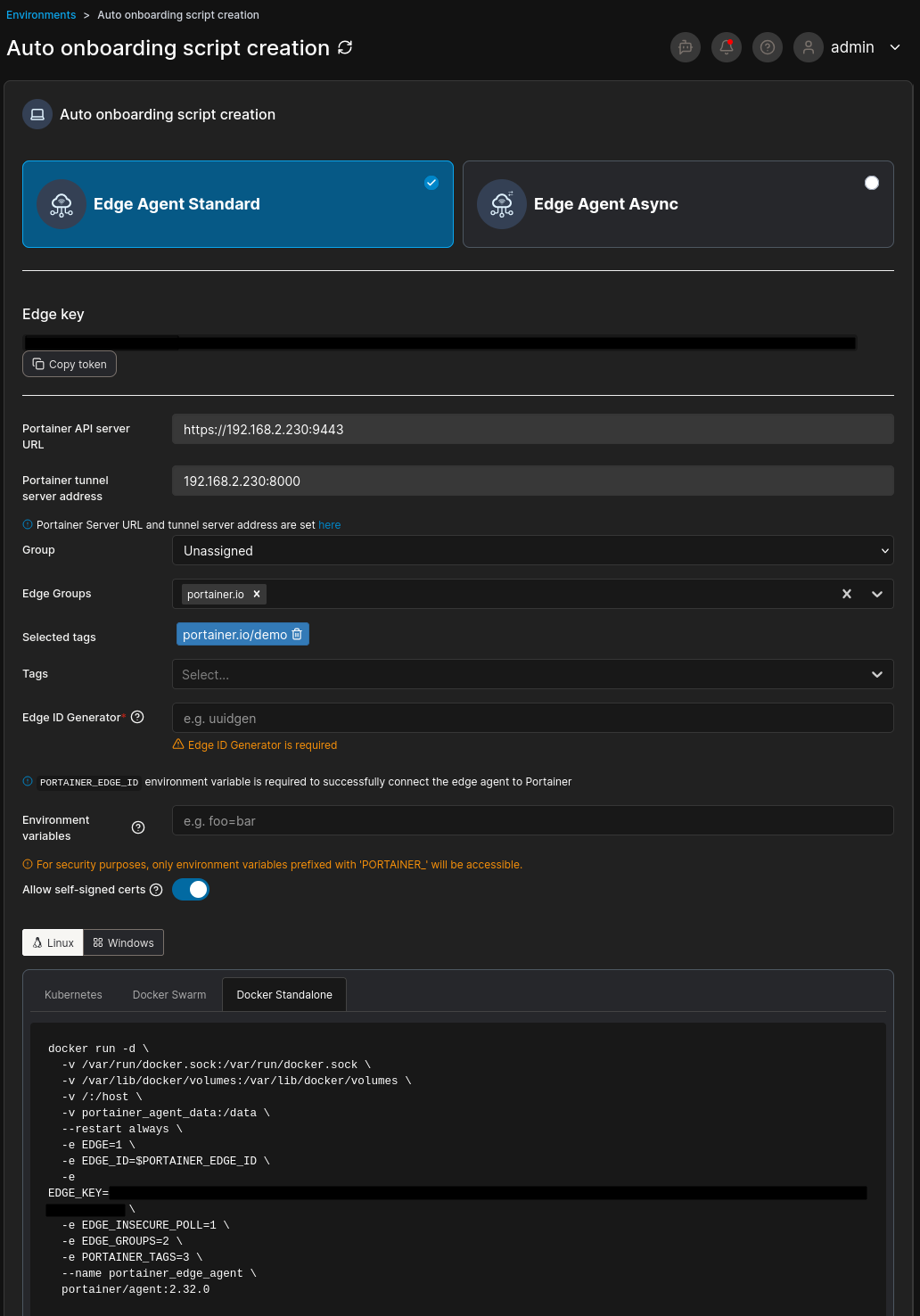
If the edge compute device is new, onboard it into Portainer with the auto-onboarding script tool under Environments. It generates a script to run on the edge device that deploys either the standard Edge Agent or the Edge Agent Async.
Portainer-managed server environment
Softing license server
The first of the two stacks deployed is the server (or cloud) layer. Deploying it first means the Softing license server and the Cedalo Pro Mosquitto MQTT broker are already running when the edge stack is configured.
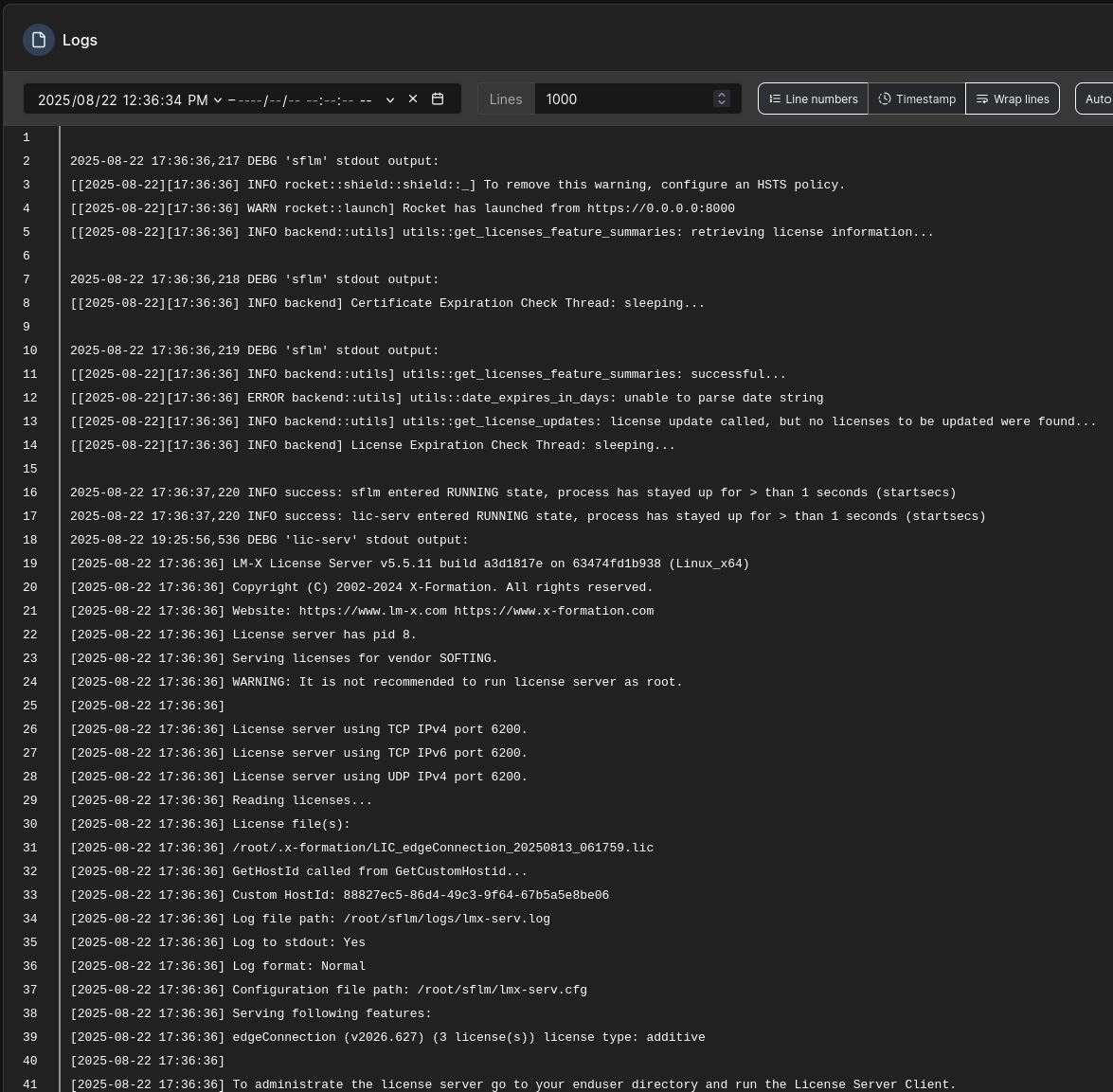
On first deployment, the Softing license server container generates a HostId. You can find it with the Logs quick action on that container. You need it to set up the Softing floating license on the server.

Cedalo Management Platform, Pro Mosquitto and InfluxDB bridge
Note: Follow the latest instructions for the version of the Cedalo Management Platform you’re using. This demo uses version 3.1, which enables the bridge features in the Cedalo Management Center and management of the Pro Mosquitto MQTT broker through the API.
As the Cedalo platform indicates, the library for the bridge you plan to use must be uncommented in the mosquitto.conf file before the Management Center can change its settings.
Once the management platform is running, check that the addressing, credentials, and any required encryption or security settings are configured so it can talk to the broker through the web interface.
From version 3.1, you can configure the bridge connection in the web interface, either through the UI or directly in the JSON editor tab. Here’s an example of the JSON configuration, including the connection section, topic mappings, and the start of the schema mappings section:
{
    "connections": [
        {
            "name": "influxdb-edgeconndemo",
            "connection": {
                "driver": "influxdbv2",
                "hostname": "influxdb",
                "port": 8086,
                "database": "mqtt_data",
                "credentials": {
                    "token": "INFLUXDB_AUTHTOKEN"
                },
                "organization": "portainer",
                "debug": false
            },
            "topicMappings": [
                {
                    "name": "wago-modbus-mapping",
                    "schemaMapping": "wago-750362-schema",
                    "target": "modbus_data",
                    "mqttTopics": [
                        "softing/wago/modbus/#"
                    ]
                }
            ]
        }
    ],
    "schemaMappings": [
        {
            "name": "wago-750362-schema",
            "mapping": [
                {
                    "source": "[payload][client_id]",
                    "target": "client_id",
                    "targetType": "tag"
                }
            ]
        }
    ]
}
Edge software deployment and configuration
Softing edgeConnector Modbus
The second stack contains the Softing edgeConnector Modbus container. Example Docker Compose file:
services:
    edgeconnector:
        image: softingindustrial/edgeconnector-modbus
        container_name: edgeconn-demo-connector
        ports:
            - 1443:443
        volumes:
            - edge_connector_config:/config
            - edge_connector_mqtt:/mqtt
        restart: unless-stopped

volumes:
  edge_connector_config:
  edge_connector_mqtt:
Once the edgeConnector container is deployed, open its web interface and sign in with the default credentials (admin/admin).
There are four areas to configure in the edgeConnector: the license server, Modbus, MQTT connections, and the MQTT publisher.
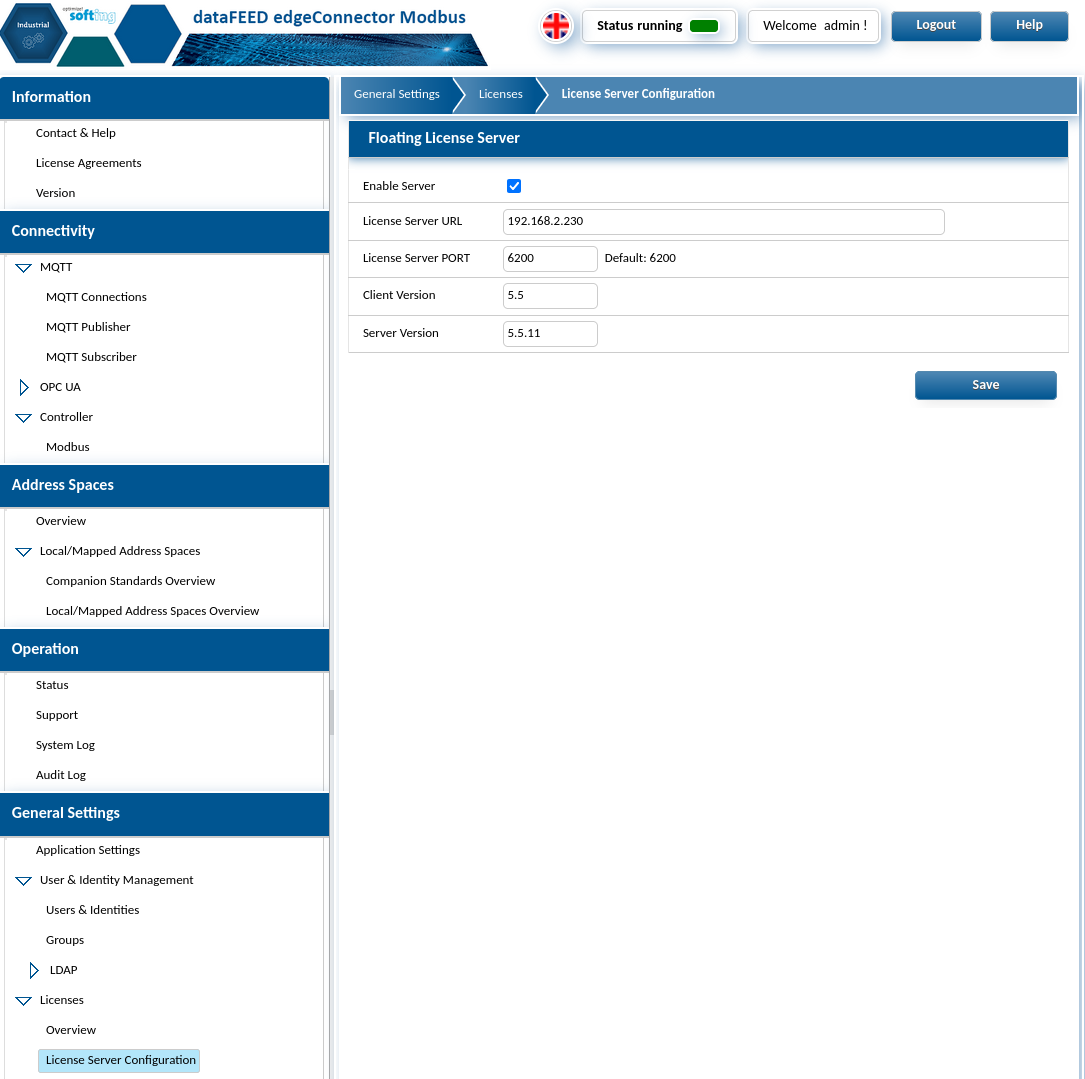
To configure the Softing license server, go to General Settings › Licenses › License Server Configuration in the left-hand menu.
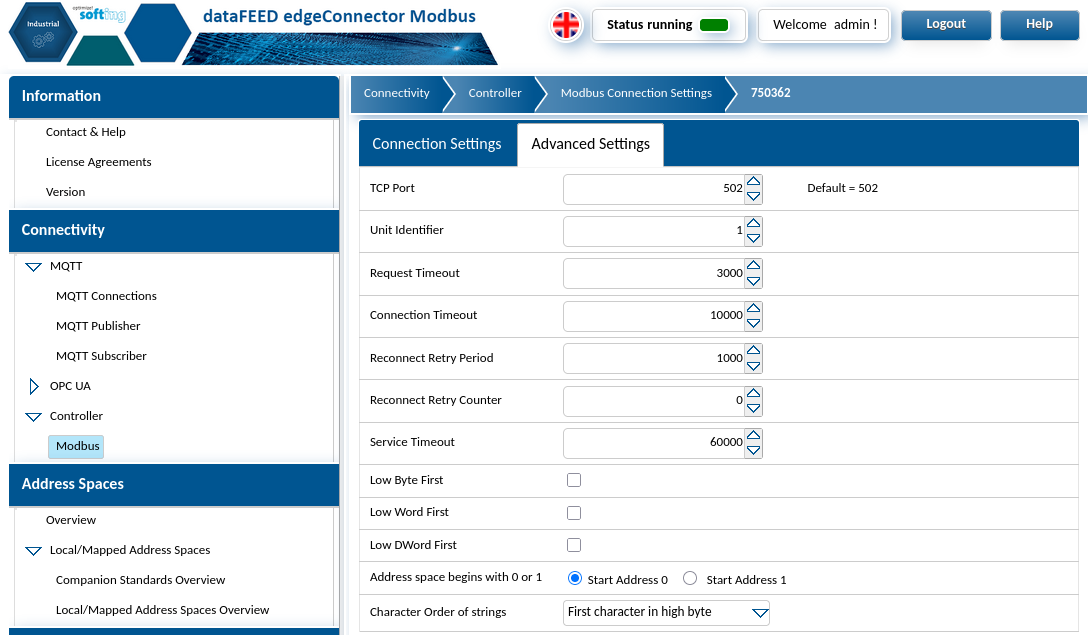
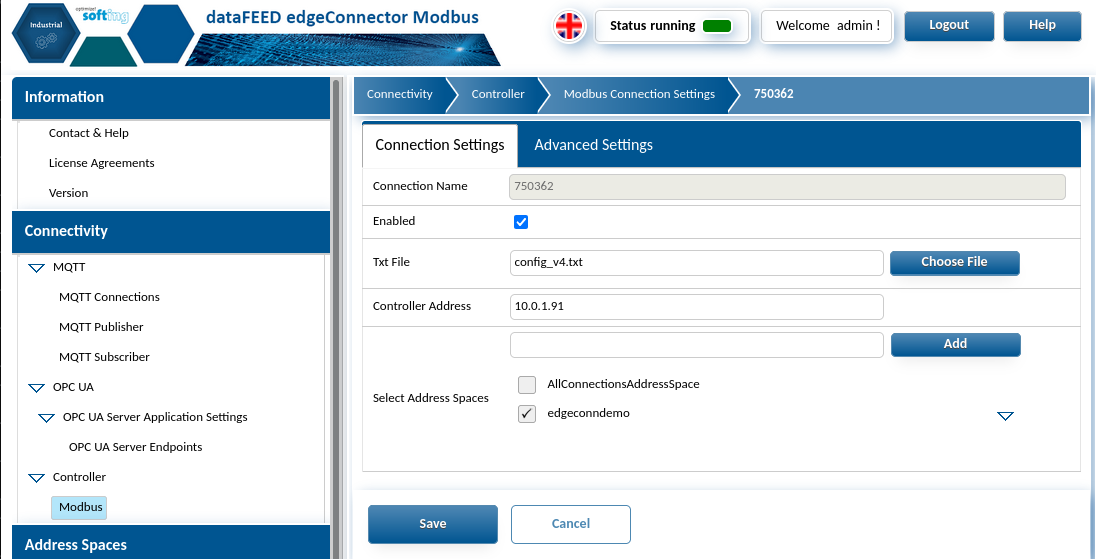
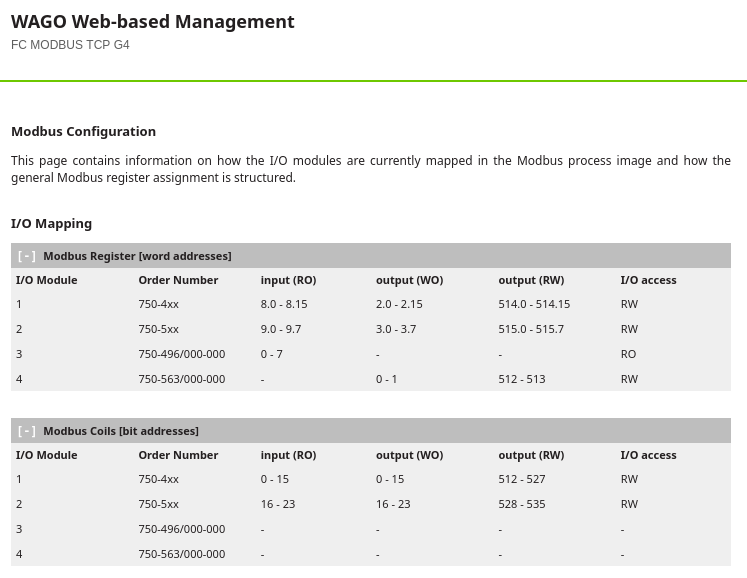
Next is the Modbus configuration, where you define the endpoint, any required credentials, and the I/O mapping. The example below uses section 11.2 (Modbus functions) of the WAGO 750-362 manual, the Modbus mapping page in the coupler’s web interface, and Softing’s Modbus guide and Modbus item syntax.
You can also create and assign Modbus address spaces here, to separate or combine endpoint data as needed. The mapping can be uploaded as a plain .txt file through the edgeConnector UI.
Example I/O mapping
# WAGO 750-362 modules
# I/O in physical order of mounting
# actual modbus addressing orders more complex models earlier in address structure

# ===== MODULE 1: 750-439 (8DIO/DIA) - Position 01
# Digital Inputs
m01ch01di=IRX8.0
m01ch02di=IRX8.1
m01ch03di=IRX8.2
m01ch04di=IRX8.3
m01ch05di=IRX8.4
m01ch06di=IRX8.5
m01ch07di=IRX8.6
m01ch08di=IRX8.7
m01ch08di=IRX8.8
m01ch08di=IRX8.9
m01ch08di=IRX8.10
m01ch08di=IRX8.11
m01ch08di=IRX8.12
m01ch08di=IRX8.13
m01ch08di=IRX8.14
m01ch08di=IRX8.15

# ===== MODULE 2: 750-537 (8DO/DIA) - Position 02
# Digital Outputs
m02ch01do=HRX515.0
m02ch02do=HRX515.1
m02ch03do=HRX515.2
m02ch04do=HRX515.3
m02ch05do=HRX515.4
m02ch06do=HRX515.5
m02ch07do=HRX515.6
m02ch08do=HRX515.7

# ===== MODULE 3: 750-496 (8AI 0/4-20mA) - Position 03
# Analog Input Values
m03ch01ai=HR0
m03ch02ai=HR1
m03ch03ai=HR2
m03ch04ai=HR3
m03ch05ai=HR4
m03ch06ai=HR5
m03ch07ai=HR6
m03ch08ai=HR7

# ===== MODULE 4: 750-563 (2AO 0-20mA) - Position 04
# Analog Output Values
m04ch01ao=HR512
m04ch02ao=HR513
MQTT connections and publisher
After the Modbus configuration, go to Connectivity › MQTT › MQTT Connections and then Publisher.
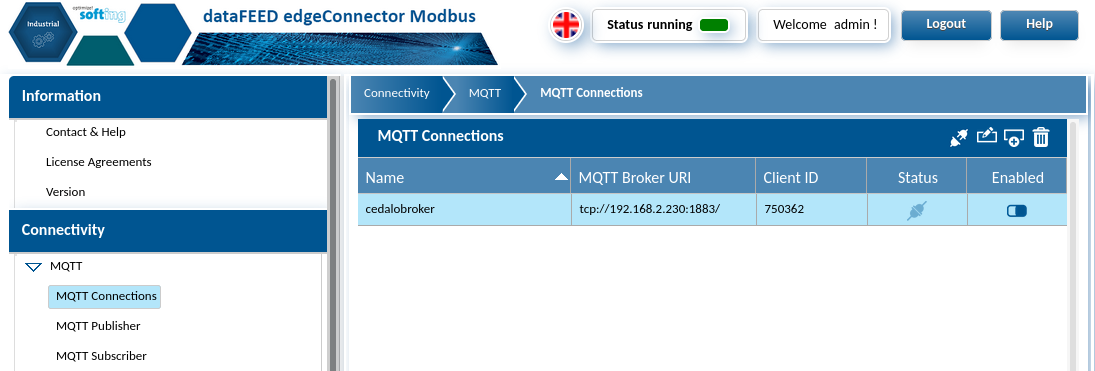
The connection needs the usual MQTT settings for your use case. This demo uses basic authentication to the Cedalo broker, with dynamic security enabled when the server stack was deployed.
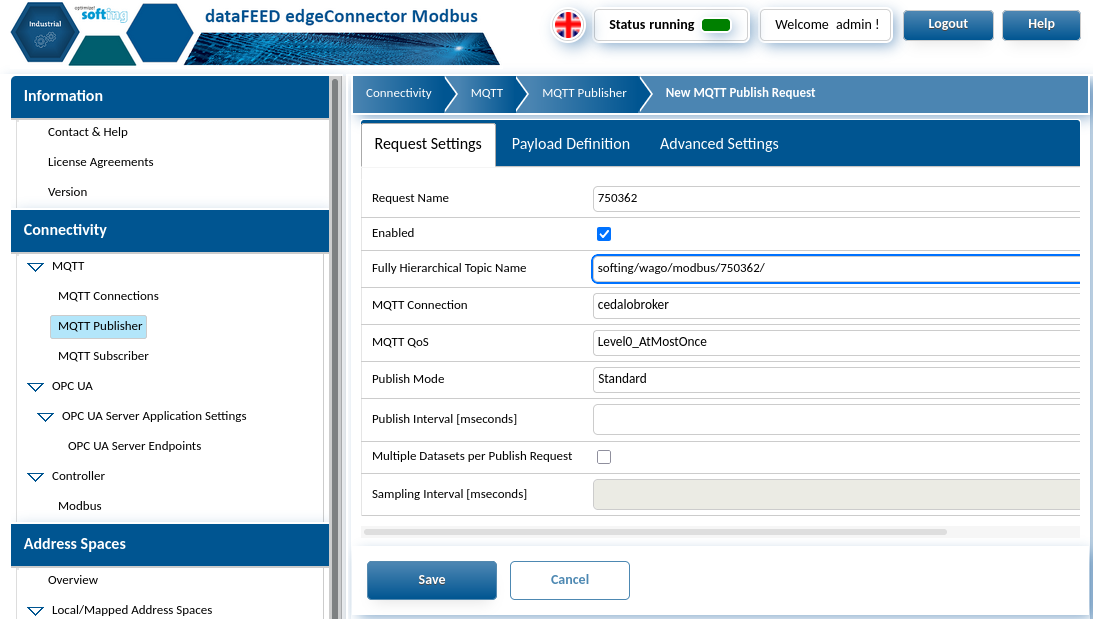
Once the connection succeeds, move on to the publisher. Select the connection you just created, name the request, and set the MQTT payload handling. The main setting here is the payload definition.
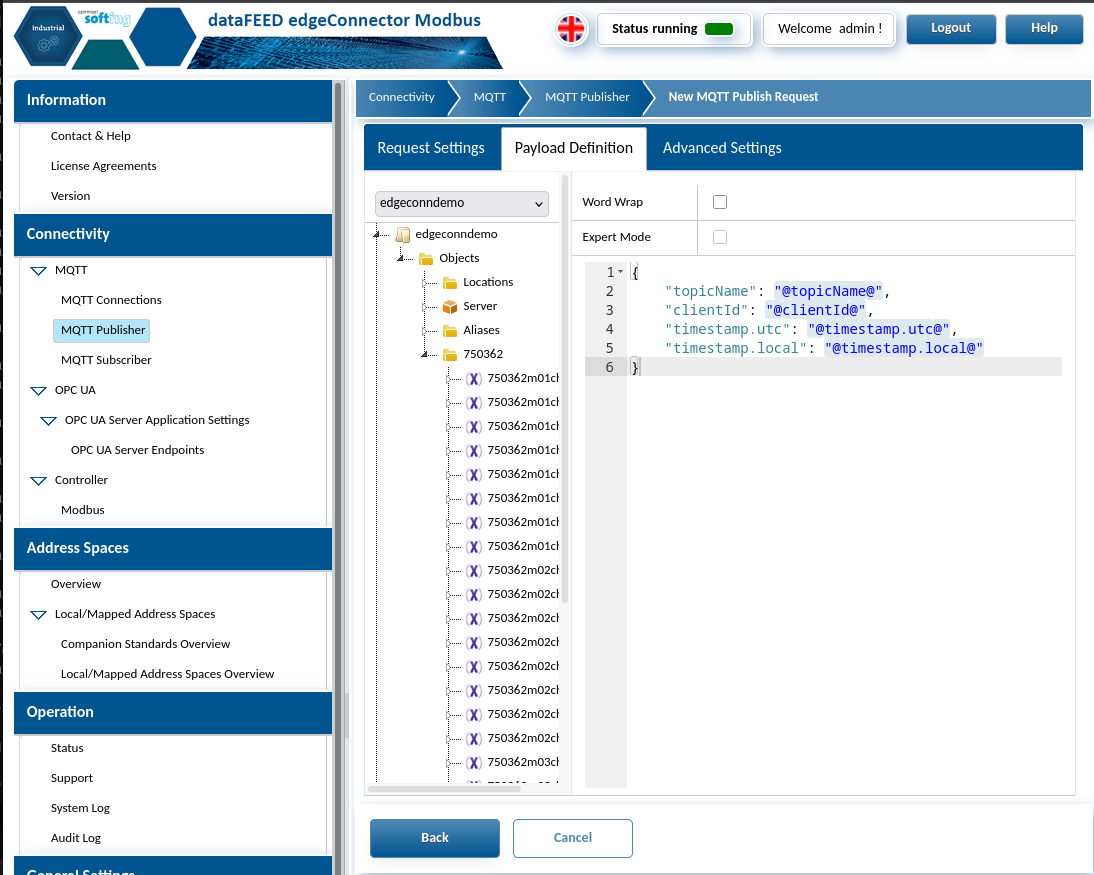
Depending on the address space you chose when setting up the Modbus connection, expand the tree down to the object level, where the Modbus connection name appears as a folder. Double-click the folder to add all of its points, or expand it to add individual items to the payload.
When you’re done, you can check that the data points reach the Cedalo broker with an external client (MQTT Explorer or similar) or with the tree explorer in the Cedalo Management Center.
Note: The Cedalo InfluxDB bridge used in this demo can’t currently parse the . characters that Softing uses in its payload by default. Here’s the adjusted payload template:
{
    "topicName": "@topicName@",
    "clientId": "@clientId@",
    "timestamputc": "@timestamp.utc@",
    "timestamplocal": "@timestamp.local@",
    "m01ch01di": "@edgeconndemo/Objects/750362/m01ch01di/value@",
    "m01ch02di": "@edgeconndemo/Objects/750362/m01ch02di/value@",
    "m01ch03di": "@edgeconndemo/Objects/750362/m01ch03di/value@",
    "m01ch04di": "@edgeconndemo/Objects/750362/m01ch04di/value@",
    "m01ch05di": "@edgeconndemo/Objects/750362/m01ch05di/value@",
    "m01ch06di": "@edgeconndemo/Objects/750362/m01ch06di/value@",
    "m01ch07di": "@edgeconndemo/Objects/750362/m01ch07di/value@",
    "m01ch08di": "@edgeconndemo/Objects/750362/m01ch08di/value@",
    "m02ch01do": "@edgeconndemo/Objects/750362/m02ch01do/value@",
    "m02ch02do": "@edgeconndemo/Objects/750362/m02ch02do/value@",
    "m02ch03do": "@edgeconndemo/Objects/750362/m02ch03do/value@",
    "m02ch04do": "@edgeconndemo/Objects/750362/m02ch04do/value@",
    "m02ch05do": "@edgeconndemo/Objects/750362/m02ch05do/value@",
    "m02ch06do": "@edgeconndemo/Objects/750362/m02ch06do/value@",
    "m02ch07do": "@edgeconndemo/Objects/750362/m02ch07do/value@",
    "m02ch08do": "@edgeconndemo/Objects/750362/m02ch08do/value@",
    "m03ch01ai": "@edgeconndemo/Objects/750362/m03ch01ai/value@",
    "m03ch02ai": "@edgeconndemo/Objects/750362/m03ch02ai/value@",
    "m03ch03ai": "@edgeconndemo/Objects/750362/m03ch03ai/value@",
    "m03ch04ai": "@edgeconndemo/Objects/750362/m03ch04ai/value@",
    "m03ch05ai": "@edgeconndemo/Objects/750362/m03ch05ai/value@",
    "m03ch06ai": "@edgeconndemo/Objects/750362/m03ch06ai/value@",
    "m03ch07ai": "@edgeconndemo/Objects/750362/m03ch07ai/value@",
    "m03ch08ai": "@edgeconndemo/Objects/750362/m03ch08ai/value@",
    "m04ch01ao": "@edgeconndemo/Objects/750362/m04ch01ao/value@",
    "m04ch02ao": "@edgeconndemo/Objects/750362/m04ch02ao/value@"
}
This produces an MQTT payload like this:
{
    "topicName": "softing/wago/modbus/750362/",
    "clientId": "750362",
    "timestamputc": "08/29/2025 01:32:56 PM",
    "timestamplocal": "08/29/2025 01:32:56 PM",
    "m01ch01di": true,
    "m01ch02di": false,
    "m01ch03di": false,
    "m01ch04di": false,
    "m01ch05di": false,
    "m01ch06di": false,
    "m01ch07di": false,
    "m01ch08di": false,
    "m02ch01do": false,
    "m02ch02do": false,
    "m02ch03do": false,
    "m02ch04do": true,
    "m02ch05do": true,
    "m02ch06do": true,
    "m02ch07do": false,
    "m02ch08do": false,
    "m03ch01ai": 5560,
    "m03ch02ai": 3,
    "m03ch03ai": 3,
    "m03ch04ai": 3,
    "m03ch05ai": 3,
    "m03ch06ai": 3,
    "m03ch07ai": 3,
    "m03ch08ai": 3,
    "m04ch01ao": 0,
    "m04ch02ao": 0
}
Improving the solution with strategic partners
Portainer works continuously with its strategic partners on solution demonstrations, best practices, and improvements to existing solutions. Every component in this demo is being developed further to support more automation and efficiency in this use case. The goal is simpler access to edge data that stays secure and repeatable, without custom engineering work for each deployment.